Translations management product guide
What is Translations management
Content managers, editors, translators, and proofreaders who work with multilingual content in Ibexa DXP often face a common set of challenges:
- context is lost when the source text isn't visible alongside the translation
- translating long and complex content items is time-consuming
- quality assurance is slow and error-prone without a direct comparison view
- switching between tools or tabs to cross-reference languages disrupts focus and slows down publishing
The Translations management package addresses these pain points through a side-by-side view, machine translation and the ability to invite reviewers to collaborate on the translation of content items or products.
The package integrates with the AI Actions framework to support machine translation providers such as Google Translate and DeepL, and AI-powered translation services like OpenAI, Anthropic, and Google Gemini.
Administrators can manage providers and configure default provider-to-language-pair mappings directly in Ibexa DXP's back office, while editors can trigger machine translation from the content editing interface.
Note
Translations management is a standalone set of features.
Although some views are similar to those delivered by the Automated translations opt-in package, Translations management does not require the ibexa/automated-translation package to run.
These two packages use different namespaces, service tags, and provider interfaces.
If you're currently using Automated translations, consider migrating to Translations management.
Availability
Translations management is an opt-in capability available as an LTS Update for all Ibexa DXP editions, starting with the v5.0.10 version.
How it works
Before the translation flow can happen, an administrator sets up the translation providers and assigns language pairs to them. Then, when an editor opens a content item or product and requests a new machine translation, the system resolves which provider to use. If no language-pair rule matches, it falls back to the user's manual selection. The system then extracts the translatable fields from the source language version of a content item and sends them to the configured provider's API. The system writes the translated strings into a target-language draft of the content item or a target-language version of a product, and opens it in a side-by-side view for the editor to review and refine. The editor can save the result of content item translation as a draft, share it with a reviewer or publish it. Product translations are published when the editor closes the view without rejecting it.

Capabilities
Translation provider management
Administrators can manage translation providers and configure translation provider/language combination assignments (language pairs). This allows administrators to define which provider handles which language combination. Editors see the configured provider pre-selected when creating a new translation, but can override it if needed.
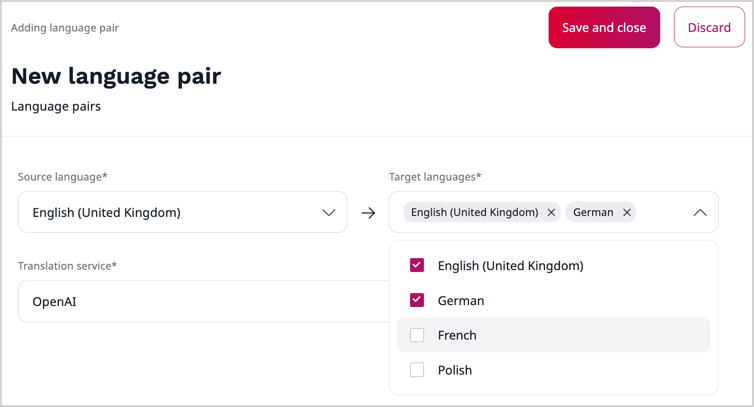
The package provides integrations with several translation providers, including REST API-based services such as Google Translate and DeepL, and AI-powered services through the AI Actions.
Side-by-side translation view
Translations management introduces a side-by-side translation view that displays the read-only source language content next to an editable target language form. In this view, editors can provide and review translations in context, without having to leave the content editing interface.
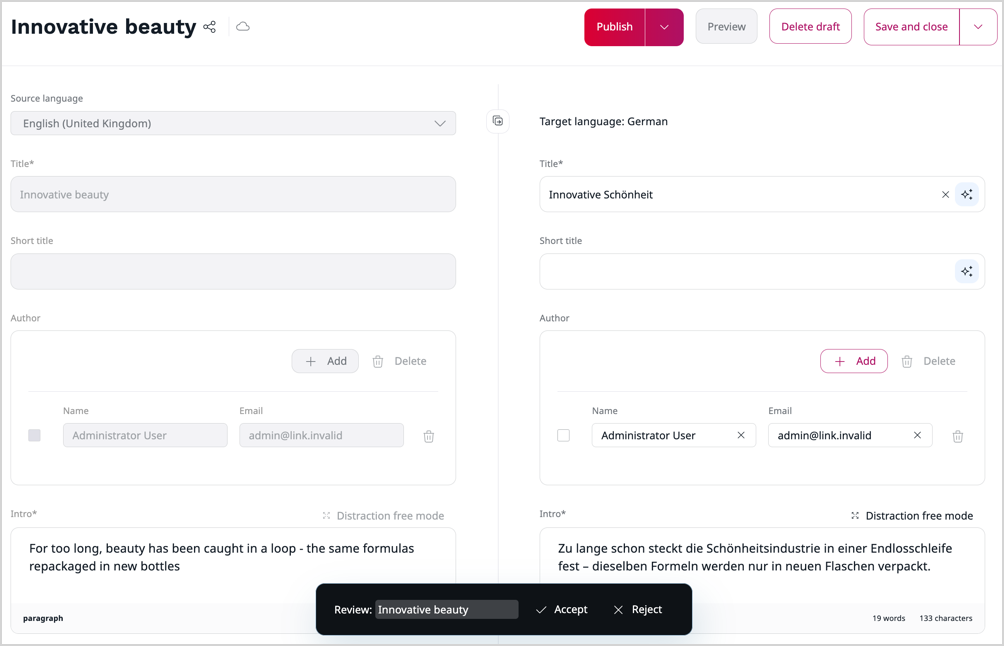
Editors can:
- access the side-by-side view when creating a new translation, reviewing an existing one, or editing a draft
- compare source and target content field by field while editing
- copy all content from the source column to the target column with a single action
- provide localized versions of media assets and their alternative text
- use the distraction-free mode for focused editing of individual fields, with AI actions available inline
- choose whether the source column appears on the left or right in user settings
Excluded content types
Content types that are editable in Page builder or Form builder are excluded from side-by-side editing.
Products are editable in the side-by-side view, but product attributes aren;t translatable.
Command-line translation
The Translations management package exposes a console command for translating content items from the command line. You can use it for batch processing or automated workflows.
Translation review
When a draft translation of a content item or product is created by going through the automatic translation process in the back office, the system creates a review status record and marks the draft as "For review". The console command bypasses this and drafts created with command-line translation aren't assigned a review status. Editors can accept or reject the translation directly in the side-by-side view. Accepted drafts are marked as "Translated".
When the editor rejects the translation, the status doesn't change, but the system records that the draft translation required corrections for statistical purposes. A draft translation in the "Translated" state can't be rejected anymore.
The ibexa_auto_translation_review workflow is separate from the editorial workflow.
Accepting or rejecting draft translations does not trigger editorial workflow transitions or notifications.
No review for human translations
Draft translations that were created by a human don't have a review status.
Extensibility
Developers can extend the translations management package:
- create custom translation providers
- add support for custom fields
- add custom content type exclusion rules
- tap into the translation lifecycle with events
Benefits
Streamlined translation process
Translations management reduces the time needed to create and publish multilingual content. Editors can initiate machine translation directly from the content editing interface and work on the result immediately in the side-by-side translation view, without having to switch contexts or use another translation tool.
Better translation quality and consistency
Machine-translated drafts are marked for review, allowing editors to accept or reject them directly in the side-by-side translation view. This eliminates the need for a separate workflow or tool.
With the side-by-side translation view, editors can conveniently compare source and target content while editing. Seeing the translation in context makes it easier to identify omissions, inconsistencies, and translation errors.
Flexible support for different translation providers
Regardless of technical and conceptual differences, the experience of working with various translation providers is the same. Administrators can assign providers to specific language pairs and editors can override the assignment when needed.
Readiness for automated processing
The CLI command enables integration with automated processes, which can help you reduce manual effort for large content volumes.